












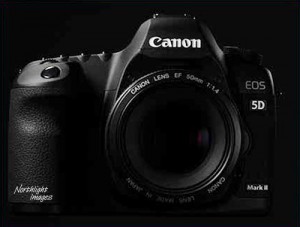
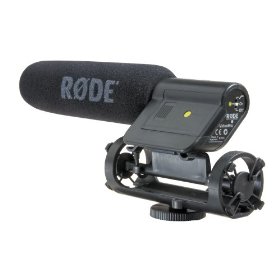
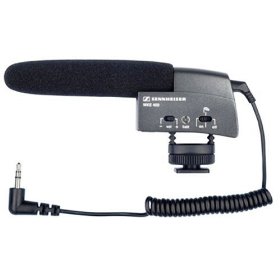
As we all know the video feature on the 5dmk2 is great but the sound recording options are not. I have only had the camera a couple of weeks and have fallen foul of the poor audio. I have a Sennheiser MK400 mic to go on top of the camera for better sound but it needs to be powered, so if you forget to check that battery you have mute sound. Also the auto gain control on the camera is hideous, if something loud is suddenly heard the AGC crashes the audio down to practically zero then brings it back up again and of course it’s just an on camera mic, so best for b-roll really. I have heard the Rode mono mic is very good. Please click on the images below for more info and pricing.
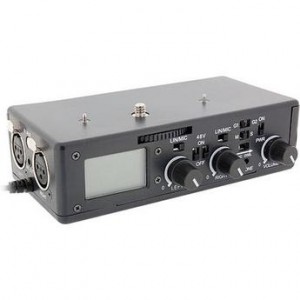
Now there are two solutions for this. First up is the new Beachtek box that not only gives you XLR inputs but it has it’s own method to soften the audio out so when it goes into the 5d you don’t have the same crash in sound if something loud happens. You also get manual level controls and a headphone monitor! BUT…you are only monitoring what is coming into the Beachtek box, not what is being recorded. There is no way of knowing exactly, if anything, is being recorded onto the 5d without playing back the clip after recording, not great, but that is a limitation of the camera itself, not the beachtek. It’s a good solution for recording sound in camera, although I haven’t seen it yet so we need to see how well it works, it has sold out so that is a good sign. But there is another way…

What the best solution currently out there until we have a decent adaptor is really is to record separately, that may sound old fashioned and very “film like” but it’s a lot easier than you think thanks to a very clever piece of affordable kit and a neat piece of software.
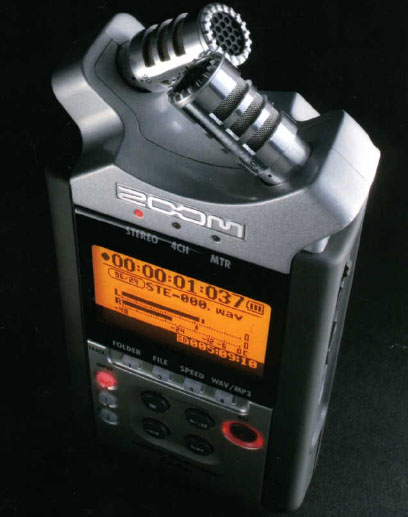
The Zoom H4n is a remarkable little device. It records everything from .mp3 48khz to 24bit 96khz. It has built in stereo condenser microphones and two XLR inputs which means you can record 4 channels of audio at the same time. It records onto SD cards and runs on 2AA batteries for about ten hours. It costs about $349.
If the idea of recording audio to sync in the edit scares you, don’t worry. Things have advanced a lot and you don’t even need a clapperboard! Watch the excellent tutorial from Zacuto and then look at the video below for a remarkable plug in for Final Cut Pro that does ALL the sync work for you. It’s never been easier (apart from recording in camera which is as said above, a really dodgy method!)
This is an excellent video and everything is explained so clearly. Scott also does a great job of showing how to sync in final cut pro..but there is something that helps even more!!
Check out this great plug in for FCP from Singular Software …it’s called “Pluraleyes” and it automatically syncs audio and video clips for you without the need for timecode! I does cost $149 so not dirt cheap, but it is affordable, and don’t forget you don’t have to spend ages synching everything up, and time is MONEY!!
For me, recording sound separately is the only way to get great video and audio for the 5dmk2. Cheap, really good kit, that once again makes things way more affordable and usable than ever before. There are many other audio solutions out there like the Marantz PMD661 which is also highly recommended but a bit more money. The Zoom just seems like the most affordable and practical option right now, especially if you are shooting on your own.
73 comments
Thanks Philip,
But with the video being bloody 30fps you have to screw with your wonderfully recorded sound in FCP, ‘stretching’ the audio clip to fit a 30fps video timeline? dont imagine thats exactly ideal either?
yeah, hopefully firmware for 5dmk2 will let us do 24p rather than useless true 30p that we have now!
Unless your plan was to have everything move slower (by playing 30p @ 24p or 25p), 10 seconds of action is 10 seconds of action… which means 10 seconds of audio. No matter what frame rate.
I have been looking at using the zoom for a little while now.
question, I am using ex3 and will also be using the 5d, shooting at 25p and i guess the canon at 30p plus the zoom, have you come up against synching and audio synching issues shooting 25p and 30p, and will the software fix this.
The camera shoots at 29.97fps but the file headers say 30fps. So you need to conform the 5d footage to 29.97fps then the audio will stay in perfect sync.
Awesome and exciting info. Makes a person wonder if this camera can compete. Are we compromising or is the quality sufficent? Time shall tell. Guess I should donate a £ or two. Also wondering when do you sleep?
Hi Paul
Am saving up my sleep for my flight to Boston on Monday…seriously it’s been tough keeping up with my filming commitments and the blog but I love doing both!!
It’s not as easy as shooting with a proper camcorder with in built awesome audio like the ex1, but this is a very good solution…but it does mean getting into the habit of pressing record on two different machines!
Phil I bought a Zoom H4n a while back and discovered if you add external XLR mics you get breakthrough from the on board mics. I do not know if this has been fixed but I think your readers should know this. I sent mine back as I was using it with XLRs exclusively.
This idea is fraught with danger if you forget to press the record button you have no decent sound and if this is the preferred option they might be better using a clapper board for syncing sound if they feel the $149 plug in is too dear. PS. The clapper really makes it film like !
Agreed. The XLR inputs on the Zoom H4N are useless. Better to go with the Sony PCM-D50. Search around and you will find that the Zoom’s sound quality is subpar, definitely not suitable for prime time.
do you really find them useless?
I have to agree that the H4n is useless. The primary function of any recording device has nothing to do with features. Fidelity is not a feature. An automobile that sports visual appeal, popular electronic connectivity, and a plush interior is nothing if it does not get you to your destination safely and reliably.
The H4n has a signal to noise ratio that is, in some cases, no better than magnetic tape. In some cases it is worse. I am surprised and a little dismayed at the number of people who have purchased the H4n with little regard for its poor fidelity.
About H4n: The two surprisingly missing info in the manual is Dynamic range and Signal to noise ratio. Without one knowing them no one should consider this recorder, it can easialy be a piece of junk ! Plus this is anyhow a low bitrate recorder. There are many recorders out there with the same money that can do 1563kbps. XLR input is a plus but not a big deal if you use a mixer.
i think a lot of people are looking at his in one man operation with the 5d when a mixer is out of question. But thanks for the input.
Well Philip, The Singular is resting in my rig, Beachtek flying out Tues. 26. Zoom H4n from where? Hehe.
Just a matter of EX1 & 5DMK2 shaking hands, (Gh1 might be interesting also)
You make an old man very happy.
This post comes perfectely in time !!!
You know, if the 5dmkII or GH1 had a remote start function for the video recording (do they?) you could wire up something to start/stop record on both camera and Zoom H4n at the same time, which would certainly make things simpler for sync, and for not having to remember to hit 2 different record buttons.
Hi Philip, how bulky and heavy is the H4N? Would it fit in a grooms jacket pocket?
way too bulky!!
Does the Panasonic GH-1 show you the audio level when recording video?
no it doesnt
I used a Zoom H2, the little brother of the H4, to record audio at a concert that we filmed with four Sony HDV-cams a few months ago. While editing I discovered that the audio track and the video were drifting apart, ending up with a totally unacceptable mis-match after less than 10 minutes.
I did some googling and saw that I was far from alone in discovering this little “feature”. Apparently the relatively cheap crystals in the Zoom-devices aren’t sampling at a rock steady 48kHz. Instead the actual sample rate can differ quite a lot and while some work as expected many don’t and it affects both the H2 and the H4. NOT sure about the newer H4n.
Anyway, in the end I had to resample/stretch my concert sound track to match the audio from the cameras, using a calculator and a bit of trial and error. Very annoying and perhaps a good reason to avoid the Zoom devices unless you’re prepared to stretch your audio in the NLE.
There is a guy who’s hacking the 5DII firmware at the moment, he’s already managed to turn off auto gain control and add onscreen audio meters.
http://www.cinema5d.com/viewtopic.php?f=14&t=2494
very exciting stuff
All of that sounds well and good but what software do you use if you don’t have a MAC? I use a Windows machine and Windows XP. So can someone suggest an easy to use program for Windows XP?
Howard Sheldon
Great, great post PB. I think you just convinced me to spend another $5-8k today.
“Phillip Bloom, single handedly stimulating the world economy.”
I am confused about the test you guys did with the 5D mark II. The girl who is speaking has a wireless mic clipped to her. I this what is doing the recording and not the Zoom H4n. If so would the same quality not have been achieved with the Zoom H4n mic alone?
the radio mic is not a recording device, the receiver of that mic is plugged into the xlr input of the zoom and that is what is recording the sound. Ignore the built in mics of the zoom, that is not what is being used.
Great! Where did you get the connection piece between the camera and the microphone from?
on the camera mic? it’s part of the mic
First want to thank you Philip for having such an informed blog and being so on top of your responses. As a Director | DP -your notes on the Mark ii have been invaluable.
Wanted to double check a simple “24P Mark ii workflow” with you and the users to see if I am on the right track:
1) Shoot with Mark ii and double sound using the Zoom H4n recording sound at @ 24 fps – Zoom can do that no?
2) batch convert all dallies from Mark ii – (30p) to 24fps Pro Res through compressor.
3) Import new 24fps Mark ii dallies and native Zoom 24fps sound files into FCP > sync through Singular Automatic Sync
Is this all correct?
Thanks!!! Ben Jacks, http://www.thejacksfirm.com
ben,
just found this buried deep in my spam folder amongst the penis enlargements and russian dating agencies. How weird!!
zoom doesnt record at different frame rates. it just records sound as you cannot sync time code to it.
yes you can batch convert
yes sync through singular or just the old fashioned clapper board way.
phil
Philip,
What’s your take on Zoom vs The Juicedlink setup?
Hi Philip,
Great article here. Have you tried the Juicedlink.
http://www.juicedlink.com/
how does it compare to the beachtek
thanks for the great article, its very helpful.
I’d be very interested to hear if anyone had used a lavalier microphone with the Canon 5d ii. We do a lot of corporate “talking head” interview style videos and I almost always use the lav microphone.
We had an outside firm do a couple of quick interviews in the recent past and the results were great .. except for the sound. They were just using the onboard camera microphone and in one case were shooting outdoors. The wind and bug noises were annoying to say the least.
Hello
I just did a bunch of interviews with a canon 5d mark 2. The best option at that time was the Beachtek mixer with a wired lapel mic. The wireless made too much noise. The wired mic was better but still has hiss in the end.
I think the only way proper is a separate recording source like the Zoom h4n. Its all about the mic preamps.
yeah beachtek box isn’t powerful enough. juicedlink one works well
Hey Phil, I’m in the process of learning how best to use another cheap audio recorder: the Sony PCM-M10. So far I really like the build quality, small profile and amazing battery life (over 20 hours on two AAs). No xlrs but the preamp on the minijack is very good – I can get quite good levels using an xlr to mini adapter to feed a shure sm58 to the unit, which is quite the accomplishment for a dynamic mic being plugged into a compact device. It can be attached to a camera just like the H4n and independents are making dead squirrel attachments for it too, available on e-bay.
No one has really covered the technicalities of recording sound with the 7d. Bloom would you oblige? I’m doing my research before I buy one.
I learned a long time ago to run my audio separately thru a good digital recorder where I can control things better. I like my Fostex strapped onto a sound guy.
Other than sync, I feel there is no need for audio features on the 7d.
I like the way the discussion was going about covering audio with out a budget and the big guy was all for it until the sound guy made the comment about just hiring a sound guy. It took the whole themed audio budget talk to a dead end. I did like the way the big guy crawled up the sound guys ass, that was a cool ending. This video was very informative, Thank You.
Hey Philip, what settings on the H4n do you recommend? MP3 or Wav? What bit rates?
Thanks – awesome resources and films here!
wav
Was wondering what are the best lav mics to pair with the H4n?
H4n is XLR, so depends on how much you want to spend!
Probably put the budget to around $1000 give or take.
Wondering if you can help me Philip (or anyone else 🙂 ) I just bought the H4n and seem to be getting huge amounts of hiss/noise, especially on the left hand ‘side’ of the sound…am I doing something wrong or is the unit faulty? any help would be awesome
I’m shooting a travel show on my own, I do it all. I have the EX1 and I use a camera mounted mic and a Sennheiser Lavalier on my show host (my wife). Sometimes I need to mic a second person to be able to get good sound and I can’t. Don’t know how to do it without a second audio person and a mixer… (can’t afford that right now). Some people had recommended the Azden 2-Channel Wireless UHF 2-Lavalier Microphone System. I have read too many bad reviews from this product. I have already 7 of 13 episodes and I think I have a very good chance of putting it on TV.
I need to get good sound from two people walking and only me doing all the work…
These are two sample intro for my shows…
http://www.youtube.com/watch?v=g1PRUVxb25U
http://www.youtube.com/watch?v=30o_DJg98Pg&feature=related
Thank you for your advice..
Great post!,
Do you mind if I ask a questionabout audio which I just met.
I’ve tried to convert the footage from “Canon 5D Mark II” to .m4v for iphone using.
The thing is wired that the audio track become super noisy from my iphone speaker but it works fine on headphone.
Please let me know if you have any idea how that happened.
Thank you!
Hi
Does anyone know what microphone to use to capture live audio (rock concert)
with my Panasonic AG-HPX 171 DVCPro HD P2 Cam?
Is the Sennheizer Wireless SKM 100-865 G3D a good choice
I really want to look for a quality stereo mic for this camera
Anyone got experience or ideas?
LH
Phil,
During your recent seminar in Boston (June 17, 2010) you mentioned that currently you prefer Tascam DR-100 over Zoom H4n. You said that H4n doesn’t save the file if battery dies during recording. This doesn’t seem to be the case. At least my unit didn’t have this problem. I just tested about 5 times and each time when battery died while I was recording, file did get saved just fine. Maybe this was the problem with the earlier units and then Zoom addressed the problem, or maybe this is intermittent problem.
Second problem you mentioned – Zoom doesn’t allow to set levels on each XLR independently. I just found this thread on dvxuser.com which explains that you can set different levels on H4n. It doesn’t have dedicated knobs as TASCAM DR-100, but you can still do it. Here is the thread:
http://www.dvxuser.com/V6/showthread.php?t=164883&page=5
that’s good news. Zoom must have fixed it. My two and many others had this same problem. Thanks for letting me know
Hi Phil,
I read about a small kit from Que Audio (Australia) for the 5D MkII – retails for around £250.00 all in and comes with a small shotgun mic, hotshoe adaptor, cables etc. Have you come across it? Any thoughts?
Andrea
never heard of it am afraid
I just saw one of these at an expo in LA. They look pretty sweet, and the price was stellar – at least at the expo. May go back and buy one tomorrow.
It is hard to find info on, and I do not believe they sell online.
Here is the site.
http://www.queaudio.com/product_list.php
I actually figured out an amazing cheap solution to capturing separate audio digitally, mixing levels, eq, monitoring and being able to hook up all kinds of fancy mics via xlr or 1/4″. It’s the Tascam DP-008 Digital Portastudio.
Crystal clear sound from a cheap azden shotgun mic on a handmade boompole. I’m loving it.
http://www.amazon.com/TASCAM-DP-008-8-Track-Digital-Portastudio/dp/B002YNY8GI
hey philip,
after jumping on the Zoom H4n bandwagon, I have to say I’m disappointed in that most reviews/articles completely fail to mention that using phantom power with the Zoom will suck 2x brand new AA’s dry in about 20mins.
I’m perplexed as to why you didn’t mention this? Do you only ever use your Zoom for your lav or powered mics?
Do you have a solution for when you need 48 volts of phantom power?
Thanks!
There are so many things to mention with gear I cannot mention everything! Yes Phantom sucks the zoom dry, I only use Phantom mics straight into my big cameras, for my Tascam DR100 I ue a dynamic mic powered by a 1aa battery.
thanks for the reply Philip,
I respect that you can’t cover everything on a review. All I’m saying is that I don’t understand why more people dont add it to their pros/cons lists when reviewing – its quite a limiting feature.
I guess my disappointment comes from being so used to using broadcast cameras where providing phantom power for hours on end is never really an issue.
Ah well I guess its sticking to dynamic mics or spending an extra few hundred on battery powered phantom supply units (+ extra XLR cables)
One last quick question – how does the battery life go on the Tascam when supplying phantom power? (a full charge plus fresh AA’s?)
I’ve scoured the forums and cannot find an answer to this!
Thanks for your time!
I don’t know how anyone can use anything apart from a Lapel Mic, along with receiver n stuff, for video recording, especially, on field. Nthing else really works. What mics do most amateurs use on the 7D/ 5D. Lapel Mics, i.e.
Tc
Philip, my first entry to your very valuable blog. Big thanks for spreading the word.
I’ve been working with 5DMkII/H4N setup for quite a while now and being based in UK and using PAL video system I’m shooting 25fps and recording .wav at 48KHz
Since I found out about plural eyes I’ve keep struggling using it for sync assist with random results. I constantly have audio/video drifting out of sync after few minutes. Does anyone found a way to set those two up to get it synced with no problem?
I discovered that converting it to .aiff at 24 bit does work and I successfully managed to sync few bigish multicam event coverages but than I must have changed something as got a drifting problem again.
could anyone shooting at 25fps explain it to me pretty pls? what is a best format to shoot on H4N and what to convert those files to, what timeline audio preset to use? all in 48KHz or 44.1KHz? 16,24,32 bits? Floating Point? Little Endian? Linear PCM or something else?
if there is someone who successfully syncs using Plural Eyes and shooting 5d/h4n, pls pls let me know what are those secret settings that actually works?
many thanks
tom
PMD-661, tascam dr 100 and Zoom H4n” Which one is best according to you
not used first one. prefer Tascam out of the other two.
Good afternoon, would you have any advice for recording a band the way the do it in The blogotheque take away show ( http://www.blogotheque.net )?
I was planning on getting a Zoom r16 and some lavaliers, would you recomend another equipment or recording way instead of the ones mentioned above?
Thank you.
Franco
not sure if this would be the correct spot to post but can’t seem to find anything on this.
…but somewhere i came across a tutorial on how to synch up original audio to footage that had been converted to slo mo from the 7D, using FCP??
anyone remember this??
Can you explain more what you mean…is your sound recorded at twice speed? Normal recorded sound will not sync to slow motion…
sorry for the vagueness of this, but it seems to me a few months ago i had seen a video (maybe one of yours) that had someone playing music and it was in slow motion. And I believe there was some sort of process to go back and re-synch the original sound?? it seemed to have a few different steps to it.
basically shot 60p and converted to 29.
Hi Philip, great post, however I was wondering if anyone has any tips for recording audio in camera via a line for a conference? I have seen videographers just plug in to get the audio from the mic at conferences and I will need to do something similar but not sure if will work with my 5D mark 3? Any help would be appreciated, I’m really at a loss here!
Thanks!